LG UltraGear 27GS75Q-B
The UltraGear 27GS75Q-B is LG's 2024 mainstream 27-inch QHD IPS gaming monitor. It runs at 180 Hz, or 200 Hz with overclock, supports FreeSync and G-SYNC Compatible, and has a stand with height, tilt and pivot adjustment. Brightness is a modest 300 nits, so HDR10 support is limited in practice. Owners value it for its price; the stand, brightness and isolated pixel faults are the main complaints.
27GS75Q-B (2024): 27-inch QHD IPS, 180 Hz (200 Hz overclocked). The older 27GR75Q-B (165 Hz) and the 27GS60QC-B (curved) are separate models.
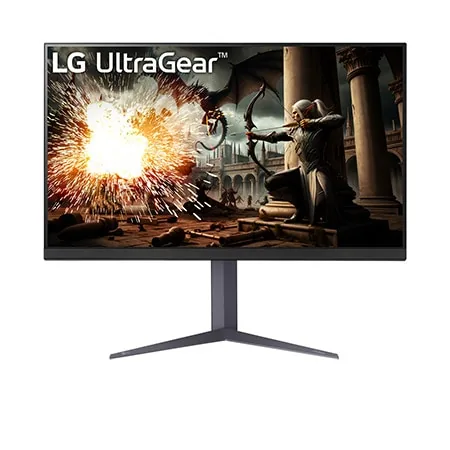
Specifications
| Specification | Value |
|---|---|
| Panel | 27-inch IPS, 2560 x 1440 (QHD), 16:9; anti-glare surface; 178° viewing angles; 0.2727 mm pixel pitch |
| Refresh rate and response | 180 Hz, 200 Hz with overclock (O/C); 1 ms GtG (in Faster mode) |
| Adaptive sync | AMD FreeSync; NVIDIA G-SYNC Compatible |
| Brightness, contrast and colour | 300 nits typical (240 minimum); 1000:1 typical contrast (700:1 minimum); 99% sRGB typical; 10-bit (8-bit + FRC), 16.7 million colours; HDR10; factory colour calibration |
| Gaming and picture features | Black Stabilizer, Dynamic Action Sync, Crosshair, FPS counter, Reader Mode, Flicker Safe, Color Weakness mode, auto input switch, user-defined key |
| Connections | 2 x HDMI; 1 x DisplayPort 1.4; 3-pole headphone out (sound only); DisplayPort cable in the box |
| Stand and mounting | Tilt, height and pivot adjustment; 3-side virtually borderless design; 100 x 100 mm VESA wall mount |
| Power | External adapter, 100-240 V; under 0.5 W in sleep, under 0.3 W off |
| Size and weight | With stand 613.5 x 577.7-467.7 x 253.7 mm; without stand 613.5 x 371.6 x 51.3 mm; 6.0 kg with stand, 4.1 kg without |
From the manufacturer
LG markets the 27GS75Q-B as a QHD IPS gaming monitor with 180 Hz (200 Hz O/C) and 1 ms (GtG) response time. LG Canada
Owner experiences and issues
In reviews written after launch, owners mostly praise the value, the smoothness at 180 Hz (200 Hz overclocked), the sharp QHD image and easy setup; several use an HDMI-to-DisplayPort adapter for VRR on a PS5, and one could not reach the top refresh rate with a MacBook Pro. The most common complaints are that 300 nits is too dim, the single joystick makes menus awkward, there are no speakers, and the stand wobbles or takes up a lot of space. One owner said the monitor tipped over easily and broke when it fell. Fault reports include dead or stuck pixels in the first months (several independent reviews), a purple/red vertical line, flicker and stripes in the first minutes, HDMI inputs that stopped working and complete failure after a few months; some users mention IPS backlight bleed and glow. One said they could not get a replacement under warranty. These individual reports do not show a failure rate.
Best Buy Canada: LG 27GS75Q-B reviews
Tags
Compare
- ASUS ROG Swift OLED PG32UCWM / LG UltraGear 27GS75Q-B
- Apple Studio Display (2026) / LG UltraGear 27GS75Q-B
- Alienware AW3226Q / LG UltraGear 27GS75Q-B
- Dell UltraSharp U3226Q / LG UltraGear 27GS75Q-B
- LG UltraGear 27G810A-B / LG UltraGear 27GS75Q-B
- LG UltraGear 27GX790B-B / LG UltraGear 27GS75Q-B
- LG UltraGear evo GX9 39GX950B-B / LG UltraGear 27GS75Q-B
- MSI MPG 322UR QD-OLED X24 / LG UltraGear 27GS75Q-B
- Samsung Odyssey OLED G6 G60SF (27-inch) / LG UltraGear 27GS75Q-B
- ASUS ROG Strix OLED XG27UCDMG / LG UltraGear 27GS75Q-B
- ASUS ROG Swift OLED PG27UCDM / LG UltraGear 27GS75Q-B
- Dell 32 Plus 4K Monitor (S3225QS) / LG UltraGear 27GS75Q-B
- Dell UltraSharp U2725QE / LG UltraGear 27GS75Q-B
- LG UltraGear 27GX700A-B / LG UltraGear 27GS75Q-B
- LG UltraGear 27GX790A-B / LG UltraGear 27GS75Q-B
- LG UltraGear 45GX950A-B / LG UltraGear 27GS75Q-B
- MSI MPG 271QR QD-OLED X50 / LG UltraGear 27GS75Q-B
- MSI MPG 272URX QD-OLED / LG UltraGear 27GS75Q-B
- LG UltraGear 32GS95UE-B / LG UltraGear 27GS75Q-B
- ASUS ROG Swift OLED PG27AQDP / LG UltraGear 27GS75Q-B
- ASUS ROG Swift OLED PG32UCDM / LG UltraGear 27GS75Q-B
- ASUS ROG Swift OLED PG34WCDM / LG UltraGear 27GS75Q-B
- LG UltraGear 27GS75Q-B / LG UltraGear 34GS95QE-B
- LG UltraGear 27GS75Q-B / LG UltraGear OLED 27GS95QE-B
- LG UltraGear 27GS75Q-B / MSI MAG 271QPX QD-OLED E2
- LG UltraGear 27GS75Q-B / MSI MPG 321URX QD-OLED
- LG UltraGear 27GS75Q-B / MSI MPG 341CQPX QD-OLED
- LG UltraGear 27GS75Q-B / MSI MPG 491CQP QD-OLED
- LG UltraGear 27GS75Q-B / ASUS ROG Swift OLED PG27AQDM
- LG UltraGear 27GS75Q-B / ASUS TUF Gaming VG279Q3A
- LG UltraGear 27GS75Q-B / Dell G2724D
- LG UltraGear 27GS75Q-B / LG UltraGear 27GR75Q-B
- LG UltraGear 27GS75Q-B / LG UltraGear 27GR83Q-B
- LG UltraGear 27GS75Q-B / LG UltraGear 27GR93U-B
- LG UltraGear 27GS75Q-B / LG UltraGear OLED 27GR95QE-B
- LG UltraGear 27GS75Q-B / LG UltraGear OLED 45GR95QE-B
- LG UltraGear 27GS75Q-B / LG UltraGear 27GP750-B
- LG UltraGear 27GS75Q-B / LG UltraFine Display Ergo 32UN880-B
- LG UltraGear 27GS75Q-B / LG UltraGear 27GL850-B