LG UltraGear 27GR83Q-B
The 27GR83Q-B is LG's 2023 27-inch QHD gaming monitor with a 240 Hz IPS panel, 1 ms GtG response at the fastest setting, 95% DCI-P3 colour and DisplayHDR 400. It has two HDMI ports (HDMI 2.1 cable included), DisplayPort 1.4 with DSC, a USB 3.0 hub and a stand with height, tilt and pivot adjustment. Tests praise motion clarity and colour, while contrast and HDR are limited as usual for IPS.
Applies to the 27-inch 27GR83Q-B (UltraGear GR8, 2023). The 27GR75Q-B (165 Hz) and 27GP850-B are separate models.
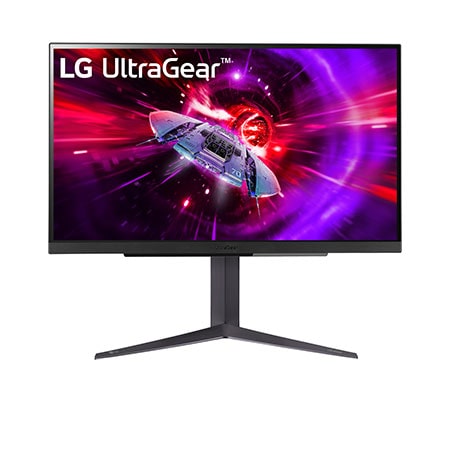
Specifications
| Specification | Value |
|---|---|
| Panel | 27-inch (68.5 cm) IPS, 2560 x 1440 (QHD), 16:9, anti-glare; 1000:1 typical contrast; 178° viewing angle |
| Refresh rate and response time | 240 Hz; 1 ms GtG (at Faster) |
| Variable refresh rate | NVIDIA G-SYNC Compatible; AMD FreeSync Premium; VRR |
| Colour and HDR | DCI-P3 95% typical (90% minimum, CIE1976); 1.07 billion colours; VESA DisplayHDR 400; HDR10; factory colour calibration; hardware calibration ready |
| Inputs and connectivity | 2 x HDMI (HDMI 2.1 cable in the box); 1 x DisplayPort 1.4 (DSC); 2 x USB 3.0 downstream, 1 x USB 3.0 upstream (USB-B); 4-pole headphone out (audio + mic) |
| Gaming and audio features | Black Stabilizer, Dynamic Action Sync, crosshair, FPS counter, user-defined key, auto input switch, Reader Mode, Flicker Safe; DTS Headphone:X |
| Stand and mounting | Tilt, height and pivot adjustment; 100 x 100 mm VESA; 3-side virtually borderless |
| Power | External adapter (19 V / 3.42 A, 65 W); 50 W typical consumption; under 0.5 W in sleep |
| Size and weight | Without stand 613.5 x 371.6 x 51.3 mm, 4.3 kg; with stand 613.5 x 467.7–577.7 x 253.7 mm, 6.2 kg |
From the manufacturer
LG markets the 27GR83Q-B as a QHD gaming monitor with a 240 Hz IPS panel and 1 ms response time. LG Canada
Strengths and limitations
Monitornerds measured 394 nits at 100% brightness in SDR, 424 nits peak in HDR mode and 1048:1 contrast at 30% brightness; it found 100% sRGB and 97% DCI-P3 coverage and an average Delta-E of 2.87 out of the box and 1.08 after calibration. Overdrive works best at Fast, while higher settings add overshoot. The test sample had slight backlight leakage along the top edge. The mostly plastic but solid build and wobble-free stand were praised; the stand needs about 25 cm of desk depth, and contrast and HDR performance are weak.
Monitornerds: LG UltraGear 27GR83Q review
Tags
Compare
- ASUS ROG Swift OLED PG32UCWM / LG UltraGear 27GR83Q-B
- Apple Studio Display (2026) / LG UltraGear 27GR83Q-B
- Alienware AW3226Q / LG UltraGear 27GR83Q-B
- Dell UltraSharp U3226Q / LG UltraGear 27GR83Q-B
- LG UltraGear 27G810A-B / LG UltraGear 27GR83Q-B
- LG UltraGear 27GX790B-B / LG UltraGear 27GR83Q-B
- LG UltraGear evo GX9 39GX950B-B / LG UltraGear 27GR83Q-B
- MSI MPG 322UR QD-OLED X24 / LG UltraGear 27GR83Q-B
- Samsung Odyssey OLED G6 G60SF (27-inch) / LG UltraGear 27GR83Q-B
- ASUS ROG Strix OLED XG27UCDMG / LG UltraGear 27GR83Q-B
- ASUS ROG Swift OLED PG27UCDM / LG UltraGear 27GR83Q-B
- Dell 32 Plus 4K Monitor (S3225QS) / LG UltraGear 27GR83Q-B
- Dell UltraSharp U2725QE / LG UltraGear 27GR83Q-B
- LG UltraGear 27GX700A-B / LG UltraGear 27GR83Q-B
- LG UltraGear 27GX790A-B / LG UltraGear 27GR83Q-B
- LG UltraGear 45GX950A-B / LG UltraGear 27GR83Q-B
- MSI MPG 271QR QD-OLED X50 / LG UltraGear 27GR83Q-B
- MSI MPG 272URX QD-OLED / LG UltraGear 27GR83Q-B
- LG UltraGear 32GS95UE-B / LG UltraGear 27GR83Q-B
- ASUS ROG Swift OLED PG27AQDP / LG UltraGear 27GR83Q-B
- ASUS ROG Swift OLED PG32UCDM / LG UltraGear 27GR83Q-B
- ASUS ROG Swift OLED PG34WCDM / LG UltraGear 27GR83Q-B
- LG UltraGear 27GS75Q-B / LG UltraGear 27GR83Q-B
- LG UltraGear 34GS95QE-B / LG UltraGear 27GR83Q-B
- LG UltraGear OLED 27GS95QE-B / LG UltraGear 27GR83Q-B
- MSI MAG 271QPX QD-OLED E2 / LG UltraGear 27GR83Q-B
- MSI MPG 321URX QD-OLED / LG UltraGear 27GR83Q-B
- MSI MPG 341CQPX QD-OLED / LG UltraGear 27GR83Q-B
- MSI MPG 491CQP QD-OLED / LG UltraGear 27GR83Q-B
- ASUS ROG Swift OLED PG27AQDM / LG UltraGear 27GR83Q-B
- ASUS TUF Gaming VG279Q3A / LG UltraGear 27GR83Q-B
- Dell G2724D / LG UltraGear 27GR83Q-B
- LG UltraGear 27GR75Q-B / LG UltraGear 27GR83Q-B
- LG UltraGear 27GR83Q-B / LG UltraGear 27GR93U-B
- LG UltraGear 27GR83Q-B / LG UltraGear OLED 27GR95QE-B
- LG UltraGear 27GR83Q-B / LG UltraGear OLED 45GR95QE-B
- LG UltraGear 27GR83Q-B / LG UltraGear 27GP750-B
- LG UltraGear 27GR83Q-B / LG UltraFine Display Ergo 32UN880-B
- LG UltraGear 27GR83Q-B / LG UltraGear 27GL850-B