Apple iPad Pro 11-inch (M5)
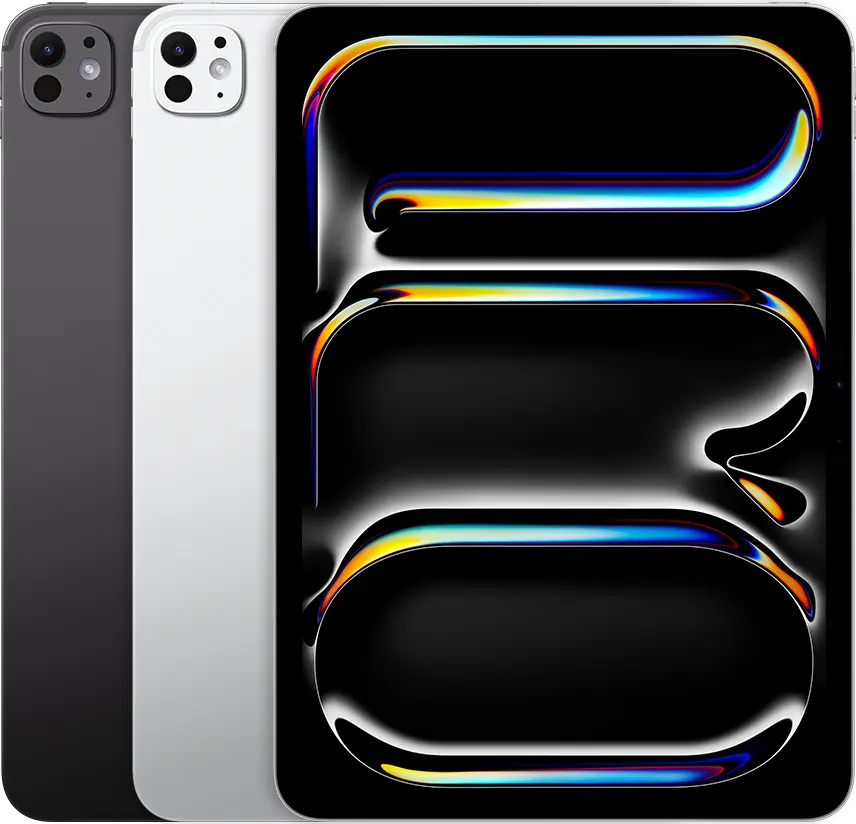
An iPad Pro with the M5 chip and an 11-inch tandem OLED display. The screen varies between 10 and 120 Hz; it has Wi-Fi 7, a single Thunderbolt / USB 4 port and Apple Pencil Pro support. The 256 and 512 GB models have 12 GB of memory; the 1 TB and 2 TB models have 16 GB.
A3357 · 11-inch · Wi-Fi · 256 GB / 512 GB / 1 TB / 2 TB
Specifications
| Specification | Value |
|---|---|
| Launch | Announced 15 October 2025; in stores from 22 October 2025 |
| Model numbers | A3357 (Wi-Fi); A3358 (Wi-Fi + Cellular); A3359 (Wi-Fi + Cellular, mainland China only) |
| Display | 11-inch Ultra Retina XDR; tandem OLED; 2420 × 1668, 264 ppi; ProMotion 10–120 Hz; P3 wide colour |
| Brightness | SDR 1000 nits; XDR 1000 nits full screen, 1600 nits peak (HDR content only); 1 nit minimum; 2,000,000:1 contrast |
| Display surface | Fully laminated; antireflective coating; fingerprint-resistant oleophobic coating; True Tone |
| Matte glass option | Optional nano-texture glass; 1 TB and 2 TB models only |
| Processor | Apple M5; 256 / 512 GB models: 9-core CPU (3 super + 6 efficiency); 1 TB / 2 TB models: 10-core CPU (4 super + 6 efficiency) |
| Graphics and AI | 10-core GPU; Neural Accelerators; hardware-accelerated ray tracing; 16-core Neural Engine |
| Memory | 12 GB unified memory on 256 / 512 GB models, 16 GB on 1 TB / 2 TB models; 153 GB/s memory bandwidth |
| Storage | 256 GB, 512 GB, 1 TB or 2 TB |
| Rear camera | 12 MP Wide; f/1.8; five-element lens; autofocus; Smart HDR 4; LiDAR Scanner |
| Front camera | Landscape 12 MP Center Stage camera; f/2.0; Face ID |
| Video recording | 4K at 24 / 25 / 30 / 60 fps; 1080p slo-mo at 120 or 240 fps; ProRes up to 4K at 30 fps (1080p at 30 fps on 256 GB) |
| Audio | Four speakers; studio-quality four-mic array |
| Wireless | Apple N1 networking chip; Wi-Fi 7 (802.11be) 2×2 MIMO; Bluetooth 6; Thread |
| Cellular | Wi-Fi + Cellular models only (A3358, A3359): Apple C1X modem; 5G (sub-6 GHz) 4×4 MIMO; eSIM only; GPS/GNSS |
| Port | One Thunderbolt / USB 4 port: USB 4 and Thunderbolt 3 (40 Gb/s), USB 3 (10 Gb/s), DisplayPort, charging |
| External display | One external display: up to 6K at 60 Hz or up to 5K at 120 Hz |
| Battery | 31.29 Wh rechargeable lithium-polymer battery; up to 10 hours of web surfing or video on Wi-Fi (Apple claim) |
| Charging | USB-C; up to 50% in about 30 minutes with a 60 W or higher adapter (such as Apple’s 40W Dynamic Power Adapter with 60W Max) |
| Size and weight | 249.7 × 177.5 × 5.3 mm; 444 g (Wi-Fi); 446 g (Wi-Fi + Cellular) |
| Colours | Space black; silver |
| Pencil | Apple Pencil Pro and Apple Pencil (USB-C); Apple Pencil hover |
| Sensors | Face ID; LiDAR Scanner; three-axis gyro; accelerometer; barometer; ambient light sensors |
| Software | Introduced with iPadOS 26 |
| Video playback | HEVC, H.264, AV1, ProRes; Dolby Vision, HDR10+/HDR10, HLG |
| Operating temperature | 0–35 °C |
From the manufacturer
Apple highlights the M5’s speed in AI workloads, the brightness of the tandem OLED display and the new N1 networking chip. App speed also depends on iPadOS and how an app uses the hardware. Apple Newsroom
Strengths and limitations
Notebookcheck finds the screen bright and colour-accurate on its 1 TB / 16 GB / 5G unit. It measures just under 1,000 cd/m² in SDR and up to 1,572 cd/m² with HDR content.
Notebookcheck: Apple iPad Pro M5 (2025) tablet reviewNotebookcheck measures 240 Hz PWM flicker on the display. The review text says lower-amplitude DC dimming is used above 50% brightness, while the measurement section on the same page shows flicker at 88% brightness and below. The two statements do not fully match.
Notebookcheck: Apple iPad Pro M5 (2025) tablet reviewIn Notebookcheck’s Wi-Fi battery test the tablet lasts about 12 hours at adjusted brightness and just over 8 hours at full brightness. The M4 predecessor reached about 15 hours in the same test; the author attributes the gap to the M5’s high power draw in short bursts.
Notebookcheck: Apple iPad Pro M5 (2025) tablet reviewNotebookcheck says the M5 can hold full power only briefly; performance drops 20–30% in 3DMark stress tests. The back surface reaches around 40 °C under full load.
Notebookcheck: Apple iPad Pro M5 (2025) tablet reviewTechRadar writes that in its five-day test it got a full day out of the tablet, with close to six hours of screen time, while working with the Magic Keyboard. With Apple’s 40 W adapter it reached 50% in 30 minutes; a 65 W adapter shaved a little off that.
TechRadar: 11-inch iPad Pro M5 review (five-day test)
Owner experiences and issues
A MacRumors member reports an 11-inch M5 losing 11% in one night within a week of purchase. Replies suggest a restart, Low Power Mode and turning off background refresh. A 13-inch M5 owner sees at most 1–2% overnight in standby; another 11-inch M5 owner reports warmth and faster battery drain in windowed mode.
MacRumors Forums: iPad Pro Battery drains very quicklyIn a MacRumors thread members report the screen not turning off after the set 2 minutes. An 11-inch M5 owner saw it after moving to the final iPadOS 26 release and noticed faster battery drain. Turning off Attention Aware did not help one person. One member writes that iPadOS 26.3 fixed it.
MacRumors Forums: M5 iPad Pro screen doesn't turn off after 2 minsA MacRumors member reports screen freezes and apps that will not open on an 11-inch M5 iPad Pro and on a partner’s A16 iPad, both on iPadOS 26.2.1. A forced restart with the button sequence clears it for a while. Two other M5 iPad Pro owners in the thread say they have not seen it.
MacRumors Forums: Ipad Pro m5 and A16 problemsAll 21 visible Best Buy reviews are positive, most often praising the OLED screen, speed and portability. BrittanyP replaced an old MacBook Air with the iPad and a keyboard, Jessica stopped carrying a laptop, and VadzimL edits video on it. R476, upgrading from an M4, saw no heat or lag in long gaming sessions, and AdrianH likes external monitor support. JoseV says the body feels thin and delicate and recommends a case.
Best Buy: 11-inch iPad Pro M5, Wi-Fi 256 GB silver (MDWL4LL/A) customer reviews
Tags
Compare
- Amazon Alexa Tablet 12 Pro (2026) / Apple iPad Pro 11-inch (M5)
- Apple iPad Air 11-inch (M4) / Apple iPad Pro 11-inch (M5)
- HONOR MagicPad4 / Apple iPad Pro 11-inch (M5)
- Lenovo Yoga Tab Plus Gen 2 / Apple iPad Pro 11-inch (M5)
- OnePlus Pad 4 / Apple iPad Pro 11-inch (M5)
- Xiaomi Pad 8 Pro / Apple iPad Pro 11-inch (M5)
- Apple iPad Pro 11-inch (M5) / Samsung Galaxy Tab S11 (Wi-Fi)
- Apple iPad Pro 11-inch (M5) / Apple iPad (A16)
- Apple iPad Pro 11-inch (M5) / Apple iPad Air 13-inch (M3)
- Apple iPad Pro 11-inch (M5) / Samsung Galaxy Tab S10 FE (Wi-Fi, 8 GB / 128 GB)
- Apple iPad Pro 11-inch (M5) / Samsung Galaxy Tab S11 Ultra
- Apple iPad Pro 11-inch (M5) / Samsung Galaxy Tab S10 Ultra (Wi-Fi, 12/256 GB)
- Apple iPad Pro 11-inch (M5) / Apple iPad mini (A17 Pro)
- Apple iPad Pro 11-inch (M5) / Samsung Galaxy Tab S10+ (Wi-Fi)
Sources
- Apple: iPad Pro 11-inch and 13-inch technical specifications
- Apple Newsroom: Apple introduces the powerful new iPad Pro with the M5 chip (15 October 2025)
- Apple Support: Identify your iPad model
- Notebookcheck: Apple iPad Pro M5 (2025) tablet review
- TechRadar: 11-inch iPad Pro M5 review (five-day test)
- MacRumors Forums: iPad Pro Battery drains very quickly
- MacRumors Forums: M5 iPad Pro screen doesn't turn off after 2 mins
- MacRumors Forums: Ipad Pro m5 and A16 problems
- Best Buy: 11-inch iPad Pro M5, Wi-Fi 256 GB silver (MDWL4LL/A) customer reviews