Dell UltraSharp U2725QE
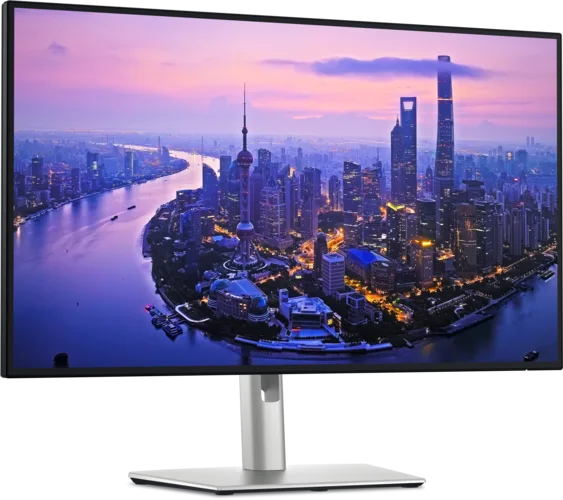
A 27-inch 4K monitor combining a 120 Hz IPS Black panel with a Thunderbolt 4 hub and 2.5 GbE networking. A compatible computer can receive video, data and power through a single cable.
U2725QE · 27-inch
Specifications
| Specification | Value |
|---|---|
| Display | 27-inch IPS Black; 3840 × 2160; 163 ppi; anti-glare surface |
| Refresh rate | 120 Hz; 48–120 Hz variable refresh |
| Brightness | 450 nits typical; 600 nits peak; HDR 600 |
| Rated contrast | 3000:1 native contrast |
| Colour | 1.07 billion colours; 100% sRGB and Rec.709; 99% DCI-P3 and Display P3; factory calibration average ΔE < 1.5 |
| Response time | 5 ms GtG (fast mode); 8 ms GtG |
| Thunderbolt 4 | 1 × upstream: video (DP 1.4, DSC), data and 140 W EPR charging; 1 × downstream: daisy chain, 15 W |
| Video inputs | 1 × HDMI 2.1 (4K 120 Hz, VRR); 1 × DisplayPort 1.4 in (DSC, HDCP 2.2); 1 × DisplayPort out |
| USB hub | Thunderbolt 4 or USB-C upstream (10 Gbit/s); 2 × USB-C (10 Gbit/s, 15 W); 4 × USB-A (10 Gbit/s, one with BC 1.2 charging) |
| Power delivery | Up to 140 W EPR |
| Ethernet | 2.5 GbE |
| Audio | 3.5 mm analogue line-out; no built-in speakers |
| Multiple sources | Built-in KVM; PiP and PbP |
| Eye comfort and sensor | ComfortView Plus (blue light ≤ 35%); TÜV 5-star eye comfort; ambient light sensor |
| Stand | 150 mm height; −5°/+21° tilt; ±45° swivel; ±90° pivot |
| VESA | 100 × 100 mm |
| Panel without stand | 612.44 × 353.51 × 55.60 mm; 5.22 kg |
| Weight with stand | 7.06 kg (with stand and cables) |
| Power consumption | 25.4 W operating; 325 W maximum; 0.5 W standby; 0.3 W off |
| In the box | Power cable; 1.8 m DisplayPort 1.4; 1 m USB-A to USB-C; 1 m passive Thunderbolt 4 cable |
| Warranty | 3-year limited hardware warranty; Advanced Exchange |
| Firmware | M2T102 (A01, 19 August 2025) |
From the manufacturer
Dell highlights improved IPS Black contrast, 120 Hz refresh and a single-cable desktop connection. Dell
Strengths and limitations
RTINGS praised text clarity and ergonomics, but noted motion blur, weak local dimming and the need for calibration to achieve the most accurate colours.
RTINGS: U2725QE lab review
Owner experiences and issues
Most verified buyers at Best Buy praise the 120 Hz refresh, colours and number of ports. RobertB replaced an older UltraSharp and is happy with daisy-chaining on a Mac; he fixed weak line-out audio with a USB-C audio adapter. DanielV reports trouble-free use after seven months. ZacharyM noticed slight darkening along the bottom of the screen.
Best Buy: Dell UltraSharp 27 4K U2725QE customer reviewsTwo Mac buyers had a different experience. dnaka found 4K scaling blurry on macOS, got eye strain and heard coil whine, while text looked sharp on Windows. JamesR wrote that the resolution did not suit macOS and whites looked washed out, and returned it.
Best Buy: Dell UltraSharp 27 4K U2725QE customer reviewsOn Japan’s Kakaku.com, Rico-ru praised the IPS Black contrast and one-step input switching with the joystick shortcut, and found it very bright even at 15% brightness. Hitoshi saw occasional flicker and display re-detection when waking from sleep in a three-monitor office setup.
Kakaku.com: Dell U2725QE user reviewsOn the same site, GrapeColor revised a rating from 5 to 1, reporting that on both of their monitors the firmware froze for up to 10 seconds, input switching slowed, the joystick and power button stopped responding during freezes, and USB usually ran at USB 2.0 speed.
Kakaku.com: Dell U2725QE user reviewsMany owners on M2T102 reported in Dell Community that auto brightness drops to 3–5% in a well-lit room (user_d2d128, javispedro, Krazana, Dbprest, Quickben, Keepps). A factory reset helped one owner for only a day. In February 2026 Dell’s community manager wrote that no newer firmware existed and that the workaround is to turn off auto brightness in the menu.
Dell Community — U2725QE, M2T102: auto brightness dims to 3%jm_cazaux reported that after the M2T102 update a MacBook Pro M4 saw the monitor only as a charger over Thunderbolt and got no image over HDMI; fully unplugging the power cord restored Thunderbolt. In May 2026 Maseer reported fixing the same issue on an M4 Pro with macOS 26 by unplugging all cables, waiting and resetting with the power button.
Dell Community — U2725QE, firmware M2T102, unrecognized on MacBook Pro (M4)On the MacRumors forum, timmah339 reports no problems since M2T102 with Thunderbolt daisy-chaining on an M3 Pro Mac. Torty is very happy on a MacBook Air M3 but loses the Ethernet connection after every restart when using the included Thunderbolt cable.
MacRumors Forums: New Dell U2725QE threadOne owner reports that when an MSI Vector 16 laptop wakes from Modern Standby or hibernation, the monitor briefly shows “Going to standby” and cuts 140 W charging; video and data continue, but charging does not resume until the monitor is unplugged and plugged back in.
Dell Community — U2725QE, M2T102: PD handshake failure on MSI Vector 16 after standby
Tags
Compare
- ASUS ROG Swift OLED PG32UCWM / Dell UltraSharp U2725QE
- Apple Studio Display (2026) / Dell UltraSharp U2725QE
- Alienware AW3226Q / Dell UltraSharp U2725QE
- Dell UltraSharp U3226Q / Dell UltraSharp U2725QE
- LG UltraGear 27G810A-B / Dell UltraSharp U2725QE
- LG UltraGear 27GX790B-B / Dell UltraSharp U2725QE
- LG UltraGear evo GX9 39GX950B-B / Dell UltraSharp U2725QE
- MSI MPG 322UR QD-OLED X24 / Dell UltraSharp U2725QE
- Samsung Odyssey OLED G6 G60SF (27-inch) / Dell UltraSharp U2725QE
- ASUS ROG Strix OLED XG27UCDMG / Dell UltraSharp U2725QE
- ASUS ROG Swift OLED PG27UCDM / Dell UltraSharp U2725QE
- Dell 32 Plus 4K Monitor (S3225QS) / Dell UltraSharp U2725QE
- Dell UltraSharp U2725QE / LG UltraGear 27GX700A-B
- Dell UltraSharp U2725QE / LG UltraGear 27GX790A-B
- Dell UltraSharp U2725QE / LG UltraGear 45GX950A-B
- Dell UltraSharp U2725QE / MSI MPG 271QR QD-OLED X50
- Dell UltraSharp U2725QE / MSI MPG 272URX QD-OLED
- Dell UltraSharp U2725QE / LG UltraGear 32GS95UE-B
- Dell UltraSharp U2725QE / ASUS ROG Swift OLED PG27AQDP
- Dell UltraSharp U2725QE / ASUS ROG Swift OLED PG32UCDM
- Dell UltraSharp U2725QE / ASUS ROG Swift OLED PG34WCDM
- Dell UltraSharp U2725QE / LG UltraGear 27GS75Q-B
- Dell UltraSharp U2725QE / LG UltraGear 34GS95QE-B
- Dell UltraSharp U2725QE / LG UltraGear OLED 27GS95QE-B
- Dell UltraSharp U2725QE / MSI MAG 271QPX QD-OLED E2
- Dell UltraSharp U2725QE / MSI MPG 321URX QD-OLED
- Dell UltraSharp U2725QE / MSI MPG 341CQPX QD-OLED
- Dell UltraSharp U2725QE / MSI MPG 491CQP QD-OLED
- Dell UltraSharp U2725QE / ASUS ROG Swift OLED PG27AQDM
- Dell UltraSharp U2725QE / ASUS TUF Gaming VG279Q3A
- Dell UltraSharp U2725QE / Dell G2724D
- Dell UltraSharp U2725QE / LG UltraGear 27GR75Q-B
- Dell UltraSharp U2725QE / LG UltraGear 27GR83Q-B
- Dell UltraSharp U2725QE / LG UltraGear 27GR93U-B
- Dell UltraSharp U2725QE / LG UltraGear OLED 27GR95QE-B
- Dell UltraSharp U2725QE / LG UltraGear OLED 45GR95QE-B
- Dell UltraSharp U2725QE / LG UltraGear 27GP750-B
- Dell UltraSharp U2725QE / LG UltraFine Display Ergo 32UN880-B
- Dell UltraSharp U2725QE / LG UltraGear 27GL850-B
Sources
- Dell: U2725QE specifications
- RTINGS: U2725QE lab review
- Dell Community — community manager DELL-ChrisM2: U2725QE/U3225QE M2T102 firmware notes
- Dell Support: Dell UltraSharp monitors may exhibit various issues (000356362)
- Best Buy: Dell UltraSharp 27 4K U2725QE customer reviews
- Kakaku.com: Dell U2725QE user reviews
- Dell Community — U2725QE, M2T102: auto brightness dims to 3%
- Dell Community — U2725QE, firmware M2T102, unrecognized on MacBook Pro (M4)
- MacRumors Forums: New Dell U2725QE thread
- Dell Community — U2725QE, M2T102: PD handshake failure on MSI Vector 16 after standby