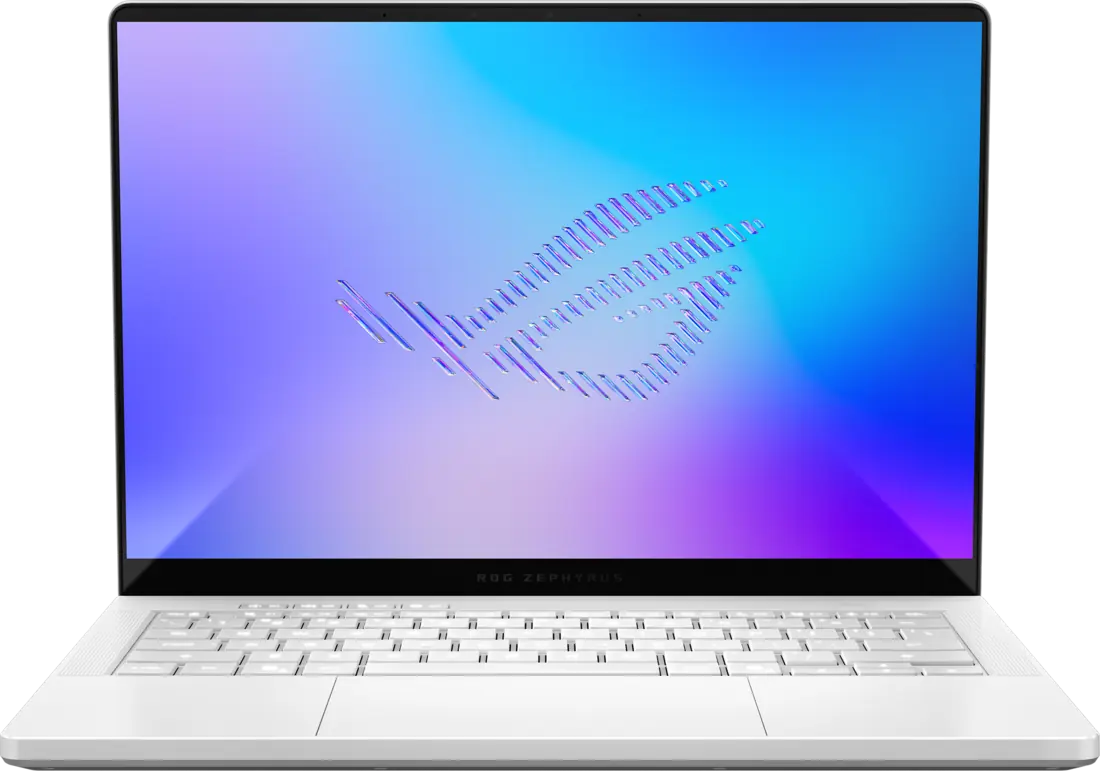
ASUS ROG Zephyrus G14 (2026) GU405
A 14-inch gaming and content-creation laptop with a discrete NVIDIA graphics card. This model code comes with Windows 11 Home, 16 GB of memory, a 1 TB SSD and an RTX 5070 Ti Laptop GPU. The memory is soldered and cannot be expanded. In reviews, the GPU’s full power comes in Turbo or Manual mode, where fan noise was measured as high.
GU405AR-ZP/G14_97T · Core Ultra 9 386H · RTX 5070 Ti · 16 GB / 1 TB
Specifications
| Specification | Value |
|---|---|
| Announcement | 6 January 2026 (introduced around CES) |
| Availability | 22 May 2026: went on sale in the US at the ASUS Online Store and Best Buy |
| Model code | GU405AR-ZP/G14_97T; Windows 11 Home |
| Processor | Intel Core Ultra 9 386H; 2.1 GHz base, up to 4.9 GHz; 18 MB cache |
| Core layout | 16 cores / 16 threads: 4 performance, 8 efficient, 4 low-power efficient cores |
| Neural processor (NPU) | Intel NPU, up to 50 TOPS |
| Integrated graphics | Intel Graphics, 4 Xe cores |
| Discrete graphics | NVIDIA GeForce RTX 5070 Ti Laptop GPU; not the same processor as the desktop RTX 5070 Ti |
| Graphics memory | 12 GB GDDR7 |
| GPU power limit | Turbo: 115 W (100 W + 15 W Dynamic Boost); Manual: 130 W (110 W + 20 W Dynamic Boost); 1812 MHz |
| Display | 14-inch OLED; 2880 × 1800 (3K); 16:10; 120 Hz; Pantone Validated |
| Display features | ROG Nebula HDR; 1100 nits peak brightness; VESA DisplayHDR True Black 1000; 100% DCI-P3; 0.2 ms; G-SYNC; ambient light sensor |
| Display glass | Corning Gorilla Glass with DXC |
| Memory | 16 GB LPDDR5X-8533, onboard; no slot, not upgradeable |
| Storage | 1 TB PCIe 4.0 NVMe M.2 SSD |
| SSD slot | 1 × M.2 PCIe including the one in use; only single-sided SSDs are supported because of components near the slot |
| Thunderbolt port | 1 × Thunderbolt 4 USB-C; DisplayPort and Power Delivery |
| Other USB | 1 × USB 3.2 Gen 2 USB-C (DisplayPort, Power Delivery, G-SYNC); 2 × USB 3.2 Gen 2 USB-A |
| USB-C power and video | Both USB-C ports support DisplayPort 2.1 and up to 100 W Power Delivery |
| Video and card reader | HDMI 2.1 FRL; full-size SD card reader (UHS-II, 312 MB/s); 3.5 mm combo audio jack |
| Wireless | Wi-Fi 7, tri-band, 2 × 2; Bluetooth 6.0 |
| Keyboard | 1-zone RGB backlight; 1.7 mm key travel |
| Lid lighting | 35-zone Slash Lighting on the lid |
| Camera | 1080p IR camera; Windows Hello |
| Audio | 6 speakers (4 woofers, 2 tweeters); Smart Amp; Dolby Atmos; array microphone; AI noise cancelling |
| Battery | 73 Wh; 4-cell lithium-ion (4S1P) |
| Power adapter | 250 W rectangular-connector adapter; 20 V / 12.5 A |
| Cooling | ROG Intelligent Cooling; redesigned bottom panel with new ventilation and exhaust layout |
| Chassis | CNC-milled aluminum; EasyLift hinge; Platinum White and Eclipse Grey colors |
| Dimensions | 311 × 220 × 15.9–18.3 mm |
| Weight | 1.58 kg |
| Security | Secured-core PC (Level 3); Pluton security processor; BIOS administrator and user passwords |
From the manufacturer
ASUS presents the G14 as a portable chassis with high performance, redesigned ventilation and an OLED display with 1100 nits peak brightness, and says it stays cool and quiet even under heavy load. ASUS ROG
Strengths and limitations
Notebookcheck considers the display the strongest part of this refresh: SDR brightness averaged about 514 cd/m², HDR content reached 1140 nits, Display P3 coverage was 99.8% and ColorChecker Delta E was 1.3. It also measured high-frequency (960 Hz), low-amplitude PWM flicker; ASUS offers software flicker-free dimming.
Notebookcheck: One of the best compact gaming laptops gets a brighter OLED - Asus ROG Zephyrus G14 2026 ReviewIn the same test, maximum fan noise was 38.2 dB(A) in Silent, 49.8 dB(A) in Performance and 55.5 dB(A) in Turbo. Notebookcheck writes that full GPU performance needs Turbo, which brings loud fans; in everyday use the laptop stays quiet.
Notebookcheck: One of the best compact gaming laptops gets a brighter OLED - Asus ROG Zephyrus G14 2026 ReviewIn Ultrabookreview’s test the GPU ran at about 45 W in Silent mode; the review says ASUS lists 80 W for that mode. The author says a newer BIOS might change this.
Ultrabookreview: Asus ROG Zephyrus G14 review (GU405 2026 gen, Intel Panther Lake, RTX 5070Ti)The same review measured head-level noise of under 35 dBA in Silent, about 42 in Performance, about 48 in Turbo and about 52 dBA in Manual. Gaming on a desk reached 80–85 °C, or 75–80 °C with the laptop raised; the processor reached 90 °C or more in Turbo and Manual. The author does not recommend Manual because of noise and limited gains.
Ultrabookreview: Asus ROG Zephyrus G14 review (GU405 2026 gen, Intel Panther Lake, RTX 5070Ti)Ultrabookreview’s cons list includes a screen that opens only about 130°, ghost touches from the large touchpad on a lap, a weak low-light webcam and no fingerprint reader.
Ultrabookreview: Asus ROG Zephyrus G14 review (GU405 2026 gen, Intel Panther Lake, RTX 5070Ti)Battery life was roughly 6–14 hours in light use depending on the task, and only a little over an hour when gaming.
Ultrabookreview: Asus ROG Zephyrus G14 review (GU405 2026 gen, Intel Panther Lake, RTX 5070Ti)Geeknetic’s processor stress test reached 96 °C with some throttling (processor peak 79 W); the GPU peaked at 125 W and 77.9 °C. In balanced mode at maximum brightness the battery lasted about 5 hours.
Geeknetic: ASUS ROG Zephyrus G14 2026 GU405 ReviewGeeknetic measured an average factory Delta E of 4.13 with a cool white point and 407 nits SDR peak brightness. Notebookcheck found a Delta E of 1.3 and 514 cd/m² average on the same panel family. The reason for the difference is not explained.
Geeknetic: ASUS ROG Zephyrus G14 2026 GU405 ReviewNoticias3D got 11 hours 45 minutes in its lab battery test; it writes that fan noise approaches 50 dBA in the highest performance modes and considers that a significant figure. It says the cooling keeps performance stable without throttling in all Armoury Crate modes.
Noticias3D: ASUS ROG Zephyrus G14 2026 review
Tags
Compare
- Lenovo LOQ 15 (15AHP11) / ASUS ROG Zephyrus G14 (2026) GU405
- Apple MacBook Air 13-inch (M5) / ASUS ROG Zephyrus G14 (2026) GU405
- ASUS Zenbook A16 (UX3607OA) / ASUS ROG Zephyrus G14 (2026) GU405
- ASUS ROG Zephyrus G14 (2026) GU405 / Acer Swift Air 14
- ASUS ROG Zephyrus G14 (2026) GU405 / ASUS ProArt PZ14
- ASUS ROG Zephyrus G14 (2026) GU405 / ASUS ROG Strix G18 (2026)
- ASUS ROG Zephyrus G14 (2026) GU405 / MSI Raider 16 Max HX
- ASUS ROG Zephyrus G14 (2026) GU405 / Razer Blade 16 (2026)
- ASUS ROG Zephyrus G14 (2026) GU405 / Apple MacBook Air 13-inch (M4)
- ASUS ROG Zephyrus G14 (2026) GU405 / ASUS ROG Strix SCAR 16 (2025) G635LX
- ASUS ROG Zephyrus G14 (2026) GU405 / ASUS ROG Zephyrus G16 (2025) GU605CX
- ASUS ROG Zephyrus G14 (2026) GU405 / HP OMEN MAX 16 (16-ah0999nw)
- ASUS ROG Zephyrus G14 (2026) GU405 / MSI Crosshair 16 HX AI D2XWGKG-211US
- ASUS ROG Zephyrus G14 (2026) GU405 / MSI Katana 15 HX B14WFK-487
- ASUS ROG Zephyrus G14 (2026) GU405 / MSI Titan 18 HX AI A2XWJG-070
- ASUS ROG Zephyrus G14 (2026) GU405 / MSI Vector 16 HX AI A2XWIG-058US
Sources
- ASUS ROG: ROG Zephyrus G14 (2026) GU405 tech specs
- ASUS ROG: The 2026 ROG Zephyrus G14 and G16 dazzle from every angle (6 January 2026)
- ASUS USA: ASUS ROG Zephyrus G14 and G16 Arrive in the US with Intel Core Ultra Series 3 and RTX 50 Series
- Intel: Intel Core Ultra 9 Processor 386H product specifications
- Notebookcheck: One of the best compact gaming laptops gets a brighter OLED - Asus ROG Zephyrus G14 2026 Review
- Ultrabookreview: Asus ROG Zephyrus G14 review (GU405 2026 gen, Intel Panther Lake, RTX 5070Ti)
- Geeknetic: ASUS ROG Zephyrus G14 2026 GU405 Review
- Noticias3D: ASUS ROG Zephyrus G14 2026 review