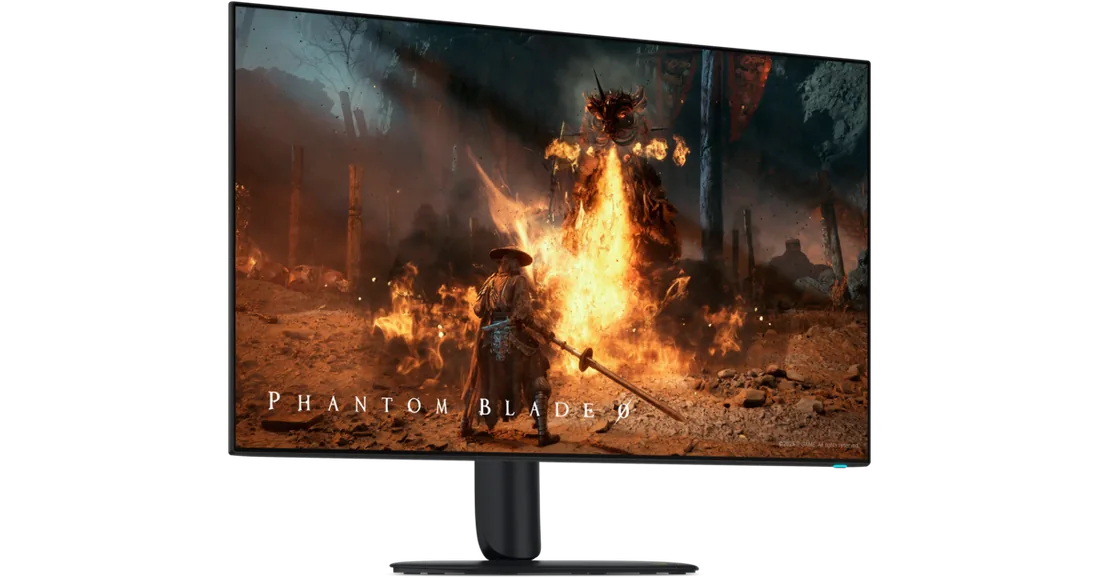
Alienware AW3226Q
A flat 4K OLED gaming monitor. RGB-stripe subpixels aim to give text cleaner edges; features include a 165 Hz refresh rate, USB hub and headphone output. USB-C cannot receive video from a laptop.
AW3226Q · Nova Black
Specifications
| Specification | Value |
|---|---|
| Model / year | AW3226Q; 2026 |
| Screen | 31.5 inches; flat; 16:9 |
| Panel | Four-stack RGB-stripe Tandem OLED |
| Resolution / refresh rate | 3840 × 2160; 165 Hz |
| Response time | 0.03 ms GtG |
| Brightness | 250 nits typical; 1000 nits HDR peak at 3% APL |
| Colour | 1.07 billion; 99% DCI-P3 (CIE 1976) |
| HDR | Dolby Vision; DisplayHDR True Black 400 |
| Adaptive refresh | G-SYNC Compatible; FreeSync Premium Pro; VESA AdaptiveSync |
| DisplayPort | 1 × 1.4; 4K/165 Hz, DSC |
| HDMI | 2 × 2.1 FRL; eARC/ARC on HDMI 1 |
| USB hub | USB-B upstream; 2 × USB-A and 1 × USB-C downstream; 5 Gbit/s |
| USB-C | 15 W charging; data; no video input |
| Audio | 3.5 mm headphone output; no built-in speakers |
| Multiple sources | PiP and PbP |
| Surface and eye comfort | Anti-reflective surface; flicker-free dimming |
| Power consumption | 33.3 W operating; 186 W maximum; 0.5 W standby; 0.3 W off |
| Warranty | 3-year limited warranty; panel exchange covering OLED burn-in |
| Stand | 110 mm height; −5°/+21° tilt; ±20° swivel |
| VESA | 100 × 100 mm |
| Panel without stand | 715.71 × 415.42 × 57.35 mm; 5.34 kg |
| Weight with stand | 8.12 kg |
From the manufacturer
Dell promotes RGB-stripe Tandem OLED for clearer text and bright HDR. This construction does not eliminate the risk of permanent OLED image retention. Dell Alienware AW3226Q
Strengths and limitations
Christian Eberle found sharp text and detail and accurate out-of-box colour on his sample. He measured 34 W at a 200-nit setting.
Tom's Hardware — Christian Eberle: AW3226Q reviewEberle found the default gamma too light; colour accuracy alone did not solve that tonal issue. White-balance adjustment in Custom Color does not provide gamma control across all tones.
Tom's Hardware — Christian Eberle: AW3226Q reviewTFTCentral found text on its sample as sharp as an LCD of the same pixel density, without the colour fringing seen on RGWB OLEDs. Total display lag measured 1.3 ms at 165 Hz and about 25 ms with a 60 Hz input.
TFTCentral — Simon Baker: Alienware AW3226Q reviewThe variable refresh range is 48–165 Hz. Moderate VRR flicker appeared in very dark scenes; the VRR anti-flicker option removed it but made games feel slightly less smooth.
TFTCentral — Simon Baker: Alienware AW3226Q reviewThe only user-controlled OLED care option is a manual pixel refresh. Pixel shift and CPC edge dimming cannot be disabled; on the test sample the left edge fell from 120 to about 89 nits. The glossy surface keeps blacks deep but can give mirror-like reflections in a bright room.
TFTCentral — Simon Baker: Alienware AW3226Q reviewTechSpot measured HDR above 1000 nits on a 2% window but 430 nits at 10% and 260 nits full screen; it found True Black mode too dim and Dolby Vision limited to about 450 nits. The sRGB mode was highly accurate at 1.53 average ΔE ITP.
TechSpot — Tim Schiesser: Alienware AW3226Q Tandem WOLED reviewAt 165 Hz there is less headroom for frame generation: with 2× frame generation, tearing becomes a risk once the base frame rate passes about 82 FPS, versus roughly 120 FPS on a 240 Hz display.
TechSpot — Tim Schiesser: Alienware AW3226Q Tandem WOLED reviewExpert Reviews measured an average ΔE of 0.97 in Creator sRGB mode and found the coating handled reflections well. The same test found edges 9–15% darker than the centre because of CPC, and slight flicker on grey tones.
Expert Reviews — Sasha Muller: Alienware AW3226Q reviewPCWorld found text crisp with virtually no colour fringing and games very impressive. For competitive players it found 165 Hz noticeably slower than rival 240 Hz OLEDs.
PCWorld — Brad Chacos: Alienware AW3226Q review
Owner experiences and issues
FANG123456 reported a red SOS-like LED pattern and no image on a newly received monitor, despite the PC detecting it. The cause is unconfirmed; one report cannot establish prevalence.
Dell Community — FANG123456: AW3226Q power LED and blank screen
Tags
Compare
- ASUS ROG Swift OLED PG32UCWM / Alienware AW3226Q
- Alienware AW3226Q / Dell UltraSharp U3226Q
- Alienware AW3226Q / LG UltraGear evo GX9 39GX950B-B
- Alienware AW3226Q / MSI MPG 322UR QD-OLED X24
- Alienware AW3226Q / Samsung Odyssey OLED G6 G60SF (27-inch)
- Alienware AW3226Q / ASUS ROG Strix OLED XG27UCDMG
- Alienware AW3226Q / ASUS ROG Swift OLED PG27UCDM
- Alienware AW3226Q / Dell UltraSharp U2725QE
- Alienware AW3226Q / LG UltraGear 27GX790A-B
- Alienware AW3226Q / MSI MPG 271QR QD-OLED X50
- Alienware AW3226Q / ASUS ROG Swift OLED PG27AQDP
- Alienware AW3226Q / MSI MPG 321URX QD-OLED
Sources
- Dell Alienware AW3226Q: specifications
- Dell AW3226Q: User’s Guide, Rev. A00
- Tom's Hardware — Christian Eberle: AW3226Q review
- Dell Community — FANG123456: AW3226Q power LED and blank screen
- TechSpot — Tim Schiesser: Alienware AW3226Q Tandem WOLED review
- TFTCentral — Simon Baker: Alienware AW3226Q review
- Expert Reviews — Sasha Muller: Alienware AW3226Q review
- PCWorld — Brad Chacos: Alienware AW3226Q review