Apple MacBook Pro 14-inch (M4 Pro, 2024)
The MacBook Pro 14-inch with M4 Pro is Apple’s professional laptop released in late 2024. It offers the M4 Pro chip, a mini LED Liquid Retina XDR display, three Thunderbolt 5 ports and a 72.4 Wh battery. Testing highlighted long battery life and quiet running in everyday work, and criticised the display’s PWM flicker and non-upgradeable storage. Owners describe occasional fan noise in light work and damage to the screen coating.
The M4 Pro version of the MacBook Pro 14-inch (M4 Pro or M4 Max, 2024): 12-core CPU / 16-core GPU or 14-core CPU / 20-core GPU; 24 GB unified memory and 512 GB SSD standard. The M4 and M4 Max versions and the 16-inch model are separate.
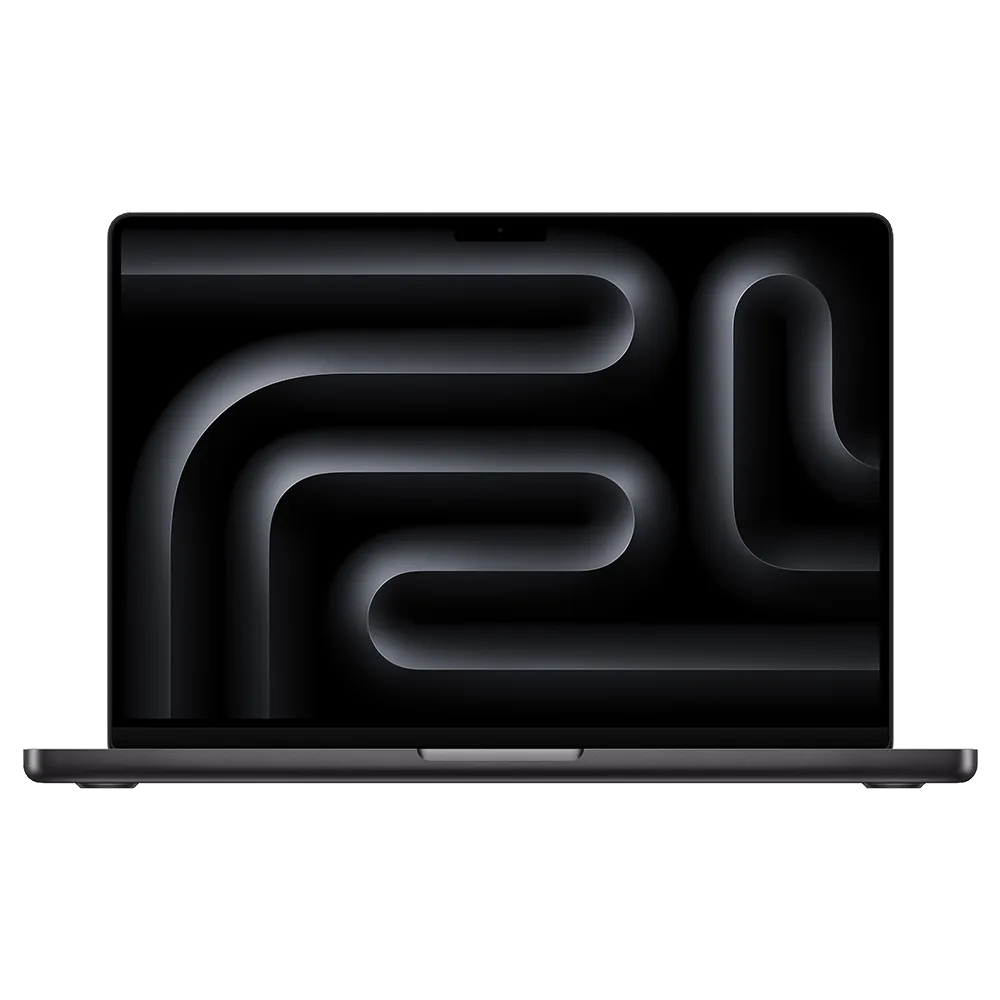
Specifications
| Specification | Value |
|---|---|
| Chip | Apple M4 Pro: 12-core CPU (8 performance + 4 efficiency) with 16-core GPU, or 14-core CPU (10 + 4) with 20-core GPU; 16-core Neural Engine; hardware ray tracing |
| Unified memory | 24 GB standard; configurable to 48 GB; 273 GB/s memory bandwidth |
| Storage | 512 GB SSD standard; configurable to 1 TB, 2 TB or 4 TB |
| Display | 14.2-inch Liquid Retina XDR; 3024 × 1964, 254 ppi; mini LED; ProMotion up to 120 Hz; 1,000,000:1 contrast |
| Brightness | XDR: 1000 nits sustained full-screen, 1600 nits peak (HDR content only); SDR: up to 1000 nits outdoors |
| Glass option | Standard glass or optional nano-texture glass |
| Ports | 3 × Thunderbolt 5 (USB-C, up to 120 Gb/s); HDMI; SDXC card slot; MagSafe 3; 3.5 mm headphone jack with support for high-impedance headphones |
| External display support | Up to two displays at 6K 60 Hz over Thunderbolt, or one 6K 60 Hz over Thunderbolt and one 4K 144 Hz over HDMI |
| Battery and charging | 72.4 Wh lithium-polymer; up to 22 hours of video streaming, up to 14 hours of wireless web; 70 W USB-C adapter with the 12-core model, 96 W with the 14-core model |
| Camera and audio | 12 MP Center Stage camera with Desk View; six-speaker system with force-cancelling woofers; Spatial Audio with Dolby Atmos; three-mic array |
| Wireless | Wi-Fi 6E (802.11ax); Bluetooth 5.3 |
| Size and weight | 1.55 × 31.26 × 22.12 cm; 1.60 kg |
| Colours | Space Black, Silver |
From the manufacturer
Apple presents the M4 Pro MacBook Pro with Thunderbolt 5, a 12 MP Center Stage camera and an optional nano-texture display. Apple Support
Strengths and limitations
On Notebookcheck’s unit with the 12-core CPU / 16-core GPU, 24 GB and nano-texture display, the screen averaged about 616 nits in SDR; colour accuracy and outdoor use with the matte surface were praised, while constant PWM flicker and slow response times were listed as cons. In the Wi-Fi web test the battery lasted 15 hours 24 minutes, and 7 hours 5 minutes at maximum brightness; the processor kept full performance down to 4% battery. The fans stayed mostly off in daily use; under Cyberpunk 2077 load the top surface reached at most 47 °C and the palm rest 33 °C. The 12-core M4 Pro was about 4% faster than the M4 in single-core and 25% in multi-core; the 14-core version was 18% faster in sustained multi-core load.
Notebookcheck — Klaus Hinum: Apple MacBook Pro 14 2024 M4 Pro base SKU laptop review
Owner experiences and issues
On Apple Community, Faizul516 wrote that the fan on their 14-inch M4 Pro briefly became audible during light tasks such as web browsing and video, which their earlier Mac mini M2 Pro never did (October 2025). Community member Allan Jones replied that fan ramp-up is normal, temperature-driven behaviour, that video streaming and browser tabs can load the machine more than expected, and suggested checking Activity Monitor. In Germany, malcolm16 found a raised spot in the screen coating of their roughly nine-month-old M4 Pro (macOS 26.3); a community member said debris between keyboard and screen may have damaged the anti-reflective coating, and the Apple Store accepted it as a warranty repair.
Apple Community: How can I reduce MacBook Pro M4's fan noise?
Tags
Compare
- Lenovo LOQ 15 (15AHP11) / Apple MacBook Pro 14-inch (M4 Pro, 2024)
- Apple MacBook Air 13-inch (M5) / Apple MacBook Pro 14-inch (M4 Pro, 2024)
- ASUS Zenbook A16 (UX3607OA) / Apple MacBook Pro 14-inch (M4 Pro, 2024)
- ASUS ROG Zephyrus G14 (2026) GU405 / Apple MacBook Pro 14-inch (M4 Pro, 2024)
- Acer Swift Air 14 / Apple MacBook Pro 14-inch (M4 Pro, 2024)
- ASUS ProArt PZ14 / Apple MacBook Pro 14-inch (M4 Pro, 2024)
- ASUS ROG Strix G18 (2026) / Apple MacBook Pro 14-inch (M4 Pro, 2024)
- MSI Raider 16 Max HX / Apple MacBook Pro 14-inch (M4 Pro, 2024)
- Razer Blade 16 (2026) / Apple MacBook Pro 14-inch (M4 Pro, 2024)
- Apple MacBook Air 13-inch (M4) / Apple MacBook Pro 14-inch (M4 Pro, 2024)
- ASUS ROG Strix G16 (2025) G615LR / Apple MacBook Pro 14-inch (M4 Pro, 2024)
- ASUS ROG Strix SCAR 16 (2025) G635LX / Apple MacBook Pro 14-inch (M4 Pro, 2024)
- ASUS ROG Zephyrus G16 (2025) GU605CX / Apple MacBook Pro 14-inch (M4 Pro, 2024)
- ASUS TUF Gaming A16 (2025) FA608UP / Apple MacBook Pro 14-inch (M4 Pro, 2024)
- GIGABYTE AORUS MASTER 16 AM6H (BYHC5USE64SH) / Apple MacBook Pro 14-inch (M4 Pro, 2024)
- HP OMEN MAX 16 (16-ah0999nw) / Apple MacBook Pro 14-inch (M4 Pro, 2024)
- Lenovo Legion Pro 5i Gen 10 (RTX 5070 Ti, OLED) / Apple MacBook Pro 14-inch (M4 Pro, 2024)
- Lenovo Legion Pro 7i Gen 10 (83F50012US) / Apple MacBook Pro 14-inch (M4 Pro, 2024)
- MSI Crosshair 16 HX AI D2XWGKG-211US / Apple MacBook Pro 14-inch (M4 Pro, 2024)
- MSI Katana 15 HX B14WFK-487 / Apple MacBook Pro 14-inch (M4 Pro, 2024)
- MSI Katana 17 HX B14WGK-032XES / Apple MacBook Pro 14-inch (M4 Pro, 2024)
- MSI Raider A18 HX A9WIG-082US / Apple MacBook Pro 14-inch (M4 Pro, 2024)
- MSI Stealth 18 HX AI A2XWJG-035US / Apple MacBook Pro 14-inch (M4 Pro, 2024)
- MSI Titan 18 HX AI A2XWJG-070 / Apple MacBook Pro 14-inch (M4 Pro, 2024)
- MSI Vector 16 HX AI A2XWIG-058US / Apple MacBook Pro 14-inch (M4 Pro, 2024)
- MSI Vector A18 HX A9WIG-223US / Apple MacBook Pro 14-inch (M4 Pro, 2024)
- Apple MacBook Pro 14-inch (M4 Pro, 2024) / Lenovo LOQ 15IRX9 (83DV00K6UK)
- Apple MacBook Pro 14-inch (M4 Pro, 2024) / MSI Sword 16 HX B14VGKG-063ID