Apple Studio Display (2026)
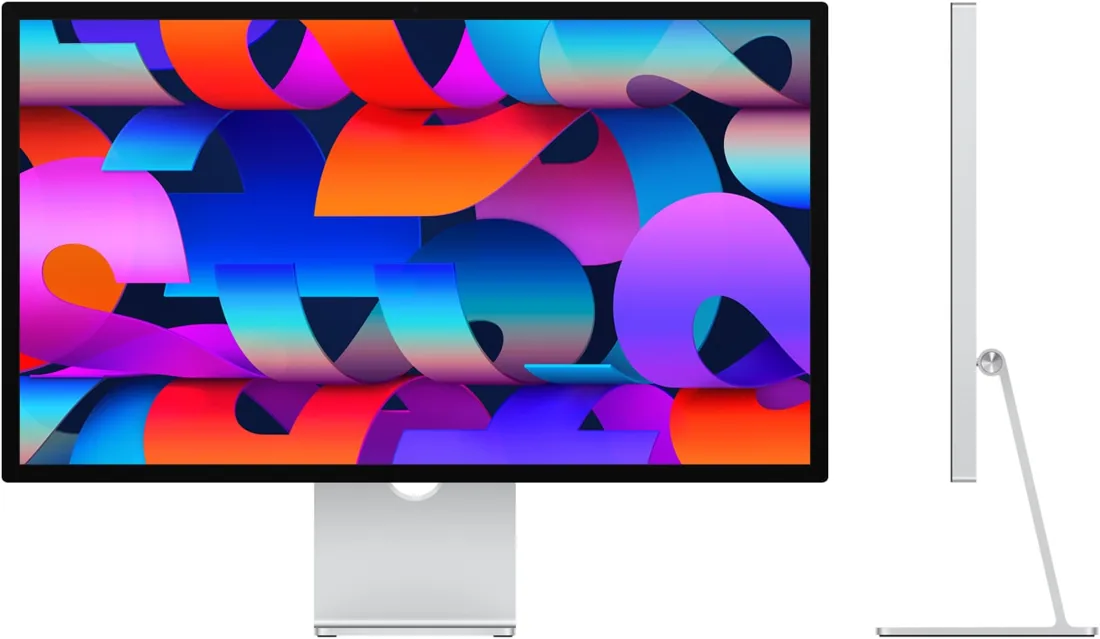
The Studio Display (2026) is the second generation of Apple’s 27-inch 5K monitor, now with Thunderbolt 5. It offers a 600-nit, 60 Hz panel, an improved 12 MP Center Stage camera, six speakers and a Thunderbolt 5 connection that charges at 96 W. A review liked the camera and the two Thunderbolt 5 ports, and criticised the panel being unchanged from the 2022 model, the lack of HDR and high refresh, and the tilt-only standard stand.
Studio Display (2026), 27-inch 5K; standard or nano-texture glass; tilt-adjustable stand, tilt- and height-adjustable stand or VESA mount adapter. The 2022 Studio Display and the mini LED Studio Display XDR are separate models.
Specifications
| Specification | Value |
|---|---|
| Panel | 27-inch 5K Retina; 5120 × 2880, 218 ppi; 60 Hz |
| Brightness and colour | 600 nits; 1 billion colours; wide colour (P3); True Tone |
| Reference modes | Apple Display (P3-600 nits), HDTV Video (BT.709–BT.1886), NTSC and PAL/SECAM Video, Digital Cinema (P3-DCI, P3-D65), Design and Print (P3-D50), Photography (P3-D65), Internet and Web (sRGB) |
| Glass | Standard glass or nano-texture glass (configurable) |
| Ports | 1 × Thunderbolt 5 upstream (up to 120 Gb/s, 96 W charging to the host); 1 × Thunderbolt 5 downstream; 2 × USB-C (up to 10 Gb/s) |
| Camera | 12 MP Center Stage with Desk View |
| Audio | Six-speaker system (four force-cancelling woofers + two tweeters); Spatial Audio for Dolby Atmos music and video; three-mic array with beamforming |
| Stand and mount | Tilt-adjustable stand (−5° to +25°); configurable tilt- and height-adjustable stand (105 mm); configurable VESA mount adapter (100 × 100 mm, landscape or portrait) |
| Size and weight | Tilt stand: 47.8 × 62.3 × 16.8 cm, 6.3 kg; tilt- and height-adjustable stand: 7.6 kg; VESA adapter: 36.2 × 62.3 × 3.1 cm, 5.4 kg |
| Compatibility | Apple silicon Macs with macOS Tahoe 26.3.1 or later; some iPad Pro and iPad Air models with iPadOS 26.3.1 or later |
| Power and box contents | Internal power supply, 100–240 V AC; 1 m Thunderbolt 5 Pro cable in the box |
From the manufacturer
Apple presents the new Studio Display with an improved camera, 30 percent deeper bass and Thunderbolt 5 connectivity. Apple
Strengths and limitations
According to Jason Cross of Macworld, the panel is the same as on the 2022 model and gets plenty bright, with good colour accuracy and uniformity. There is no HDR, and the refresh rate is fixed at 60 Hz. The camera is clearly better than before but not at iPhone level; the extra bass from the speakers was a small difference. Two Thunderbolt 5 ports were a plus, while the lack of HDMI and DisplayPort inputs and the tilt-only standard stand were minuses; height adjustment and nano-texture glass are extra-cost options.
Macworld — Jason Cross: Studio Display (2026) review
Tags
Compare
- ASUS ROG Swift OLED PG32UCWM / Apple Studio Display (2026)
- Apple Studio Display (2026) / Alienware AW3226Q
- Apple Studio Display (2026) / Dell UltraSharp U3226Q
- Apple Studio Display (2026) / LG UltraGear evo GX9 39GX950B-B
- Apple Studio Display (2026) / MSI MPG 322UR QD-OLED X24
- Apple Studio Display (2026) / Samsung Odyssey OLED G6 G60SF (27-inch)
- Apple Studio Display (2026) / ASUS ROG Strix OLED XG27UCDMG
- Apple Studio Display (2026) / ASUS ROG Swift OLED PG27UCDM
- Apple Studio Display (2026) / Dell UltraSharp U2725QE
- Apple Studio Display (2026) / LG UltraGear 27GX700A-B
- Apple Studio Display (2026) / LG UltraGear 27GX790A-B
- Apple Studio Display (2026) / MSI MPG 271QR QD-OLED X50
- Apple Studio Display (2026) / MSI MPG 272URX QD-OLED
- Apple Studio Display (2026) / LG UltraGear 32GS95UE-B
- Apple Studio Display (2026) / ASUS ROG Swift OLED PG27AQDP
- Apple Studio Display (2026) / ASUS ROG Swift OLED PG32UCDM
- Apple Studio Display (2026) / LG UltraGear 34GS95QE-B
- Apple Studio Display (2026) / LG UltraGear OLED 27GS95QE-B
- Apple Studio Display (2026) / MSI MAG 271QPX QD-OLED E2
- Apple Studio Display (2026) / MSI MPG 321URX QD-OLED
- Apple Studio Display (2026) / MSI MPG 341CQPX QD-OLED
- Apple Studio Display (2026) / MSI MPG 491CQP QD-OLED